


Systems integrators bring warehouse automation projects to life. They design conveyor layouts, integrate controls, coordinate robotics and scanning, and deliver lines that have to run reliably at production speed. In the middle of that complexity, one challenge shows up again and again: too many stations, too many vendors, and too many service calls when something doesn’t work exactly as planned.
Cubiscan helps reduce that friction. Instead of handling one isolated automation step, Cubiscan can cover multiple stages of conveyor-line automation with equipment designed to work together behind the scenes, from measurement and labeling to sortation and verification. That means fewer hands in the pot during commissioning and a simpler service path after go-live.
For an overview of equipment designed specifically for integrator-led conveyor builds, start here: automation equipment for systems integrators.
Where Cubiscan fits inside conveyor automation
Most integrator projects fall into two lanes:
- Inbound automation for receiving and data capture
- Outbound automation for end-of-line shipping and sortation
Cubiscan supports both with conveyor-ready systems that can be configured to match line speed, carton types, and identification requirements.
Inbound automation: receiving and measurement at conveyor speed
Receiving is where many warehouses either gain control or lose it. When inbound cartons arrive with inconsistent dimensions, missing data, or mixed packaging, downstream processes absorb the cost through rework, storage inefficiency, and exceptions.
Automated measurement on inbound conveyor lines helps prevent that by capturing consistent dimensions and weights early, tied to a scannable ID.
Conveyor-ready dimensioning for inbound data capture
Cubiscan integrator deployments commonly include automated dimensioning and weighing systems designed for high-throughput conveyor environments, including:
These systems support inbound workflows where cartons are identified, measured, and recorded automatically, without slowing the mainline.
Inbound measurement is often used for:
- Receiving audits to validate cartons before they enter storage
- Carton or case master data capture that supports handling and storage rules
- Inbound exception routing when cartons fall outside expected size or weight ranges
To see how measurement systems fit into broader operational workflows, review the dimensioning system overview.
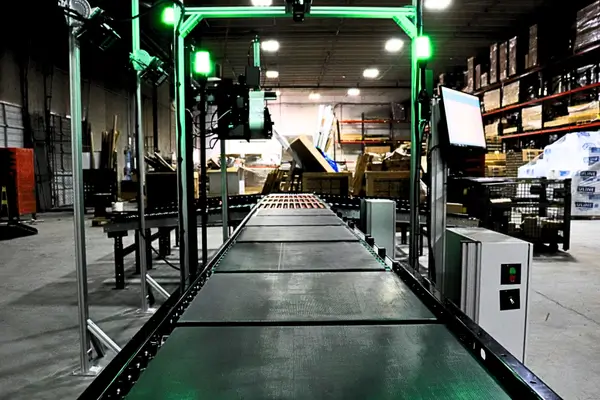
Outbound automation: automated outbound shipping
Outbound is where speed and accuracy have to stay aligned under constant pressure. A single misread barcode, a label applied to the wrong carton, or a missing measurement record can create a wave of rework, missed cutoffs, and customer dissatisfaction.
That’s why many integrator projects treat outbound as a complete, automated segment: scan, weigh, dimension, label, apply, and sort.
Cubiscan describes this approach in the SLAM context here: automated warehouse shipping solution.
Stage 1: Scan, weigh, and dimension in-motion
The first step in automated outbound shipping is creating a verified record tied to carton identity. In-motion dimensioning and weighing helps ensure that what the system thinks is shipping matches what is physically on the conveyor.
Common conveyor-ready options include:
- In-motion DWS solutions for high-throughput lines
- Systems such as Cubiscan 200-SQ and Cubiscan 210-L
When the measurement stage is stable, downstream automation becomes easier to tune and easier to maintain.
Stage 2: Print and apply labeling at line speed
Print and apply is one of the most sensitive points in the outbound line because it requires precise timing and consistent association between carton ID and the label being printed.
Cubiscan print and apply solutions are designed as modular automation components built for conveyor environments and serviceability. Learn more here:
Automated print and apply is often used for:
- Top or side label apply on cartons at speed
- Corner wrap applications where downstream scanning needs consistent placement
- Automated exception labeling to clearly identify why a carton was diverted
Stage 3: Sortation and exception routing
Outbound automation doesn’t end at labeling. The line still has to route cartons by carrier, destination, service level, or exception state. Sortation and diverting are key for keeping the mainline flowing while exceptions get handled without creating congestion.
Cubiscan supports sortation applications used in integrator projects, including sorting to an exception lane and applying an error label that explains the issue. Explore these resources:
Quality verification for automated handling
In automation environments, quality verification protects uptime. When pallets or loads are unstable, lean, or overhanging, they can create stop events in automated handling and AS/RS workflows.
Contour Pro for pallet integrity checks
Contour Pro has been sold primarily to systems integrators for quality verification, helping check pallet dimensions, overhang, and lean so automated handling can move loads safely and consistently.
Learn more here: Contour Pro pallet dimensioner.
Why integrators prefer fewer vendors on one line
Integrators are often pulled into service calls long after the install is complete, even when the underlying issue is isolated to a single station from a single vendor.
When a line includes separate vendors for measurement, labeling, printers, sortation, and verification, troubleshooting can turn into a handoff chain. That slows resolution and puts the integrator in the middle.
Cubiscan reduces vendor sprawl by supporting multiple automation stages under one partner:
- Dimensioning and weighing
- Print and apply labeling
- Sortation and exception routing
- Pallet integrity verification
This approach simplifies commissioning because systems are designed to work together. It also simplifies service because fewer vendors are involved when performance drops or exceptions increase.
To see the full equipment scope available for integrator builds, visit automation equipment for systems integrators.
What to define early in a conveyor automation project
The strongest automation projects lock a few details early so equipment, controls, and line design stay aligned:
- Carton or pallet identification method at each station
- Target conveyor speed and spacing through measurement and label apply
- Exception rules for unreadable barcodes, out-of-range dimensions, or missing weights
- Label verification approach after print and apply
- Sortation logic by carrier, destination, or exception type
- Service ownership and escalation path after go-live
When these are clear, deployment is smoother and the line runs with fewer surprises.
Build inbound and outbound automation with one partner
Systems integrators deliver complex automation projects where every station has to work together. Cubiscan supports that work with conveyor-ready systems that cover inbound measurement, automated outbound shipping, sortation, and quality verification, plus installation and service support that reduces the burden of managing multiple vendors.
To explore integrator-ready equipment, start with automation equipment for systems integrators. For end-of-line shipping automation, review automated warehouse shipping solution. For pallet integrity checks that protect automated handling, see Contour Pro pallet dimensioner.
Frequently asked questions
What Cubiscan equipment is most common in integrator conveyor projects?
Systems integrators commonly deploy in-motion dimensioning and weighing systems such as the Cubiscan 200-SQ and 210-L, plus print and apply labeling and sortation equipment depending on the line scope. When bundling all these stages together with our most common dimensioner, you can ask our team about the 275 Pro SLAM or 210-L SLAM lines.
How does Cubiscan support inbound conveyor applications?
Inbound automation often uses conveyors to automate the process of measurement to capture consistent dimensions and weights seamlessly – all while tying the data to carton identity, supporting receiving validation and early exception routing.
How does Cubiscan support automated outbound shipping?
Outbound automation typically combines scan, weigh, dimension, print & apply, and sortation into one cohesive line, commonly described as a SLAM line.
Why is Contour Pro used in automation projects?
Contour Pro supports quality verification for pallet integrity, including overhang and lean checks that help automated handling and AS/RS workflows run more reliably.
Can Cubiscan support multiple stages of an automation line?
Yes. Cubiscan supports dimensioning, print and apply, sortation, and pallet verification, which helps reduce vendor sprawl during initial deployment/installation and after the fact on-going maintenance or service.


