


Here’s a fun fact that is only fun for people who enjoy operational pain: inventory accuracy can run as low as 65% in some benchmarks. And manual data entry is not exactly a precision sport, with studies finding manual entry error rates that vary by field and can land in the low single digits.
So if the WMS is the system of record, but the data going into it is shaky, the output is going to be shaky too. That’s not a software problem. That’s an input problem.
Integrating a dimensioning system with your WMS fixes that at the source. Not with more training binders. With better data capture.
What “Integration” Actually Means (and why it matters)
A WMS is designed to collect and use real-time operational data. SAP notes that real-time data can be collected through a WMS rather than relying on manual collection methods, reducing keying errors and speeding up processes.
Integration is the difference between:
- Measuring something, then typing it into a screen later, hoping nobody messes it up.
- Measuring something, then having the dimension record flow straight into the WMS and related systems automatically.
When dimensioning data is connected to the WMS, the WMS stops guessing. And that pays off across fulfillment, freight, and parcel operations.
The payoff areas that show up fast
1) Cleaner item master data, fewer downstream surprises
Most WMS problems that “feel” like picking or shipping issues start as item master issues.
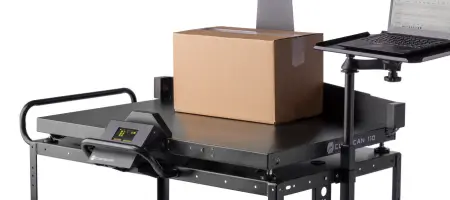
Cubiscan is built around feeding WMS item master files with accurate data at the item, case-pack, and pallet levels. When dimensions and weights live in the item master and stay current, the WMS can make better decisions about where items go and how they move.
This is also why we talk so much about master data collection: Master data for WMS is where dimensional accuracy turns into operational consistency.
2) Better slotting and space use
Slotting is only as smart as the dimensions behind it. If the WMS thinks an item is smaller than it really is, the warehouse gets overfilled locations, damaged product, and extra touches. If it thinks an item is larger than it really is, you waste space.
Accurate dimensional data supports slotting decisions by pairing size with velocity and pick characteristics. This is one of the quickest “oh wow” benefits because it hits travel time, congestion, replenishment frequency, and storage density.
3) Faster receiving, packing, and shipping, with fewer errors
If teams are still measuring with tape measures and clipboards, it is slow and inconsistent. Our own guidance on dimensioning and WMS data highlights that dimensioning systems can update inventory master files in real time or via batch uploads, replacing error-prone manual processes.
In plain terms: integrated dimensioning reduces the number of times a person has to stop, measure, re-measure, and re-type.
4) Fewer shipping charge corrections and fewer arguments
For parcel workflows, dimensioning reduces the odds of dimensional weight disputes and billing adjustments. UPS explicitly warns that incorrect package dimensions can trigger additional shipping fees and encourages avoiding charge corrections by entering correct dimensions.
Even when this is “just a few dollars” per shipment, at scale it turns into budget noise nobody enjoys explaining.
5) More useful reporting
A WMS with integrated dimensioning can do something a WMS without it struggles to do: tell the truth consistently.
Once dimensions are captured and stored in a usable format, you can trend:
- Slotting accuracy and location utilization
- Cartonization performance and over-boxing
- Picking exceptions tied to specific SKUs
- Shipping adjustments by lane, customer, or facility
That is how you move from “we think” to “we know.” It’s also how you stop having the same meeting every quarter.
What to integrate first (so you get value this quarter)
Integration projects can spiral. Here’s the simplest way to keep it practical.
- Start with item master fields that drive the most cost.
Dimensions, weight, case-pack, and pallet attributes usually top the list. - Choose one measurement workflow and lock it down.
Master data station, inbound receiving, or packing is a good start. Pick one, get it stable, then expand. - Decide how records move into the WMS.
Real-time updates versus batch uploads, and what the “source of truth” is. - Standardize the measurement record format.
Units, rounding approach, required fields, timestamps, and operator or station ID.
If you want a practical list of ways dimensioning helps a WMS perform better, we laid it out here: Six ways to save your WMS using dimensioning systems.
Next step: Put your WMS on better data
If the WMS is already in place, integrating dimensioning is one of the most direct ways to make it more accurate, more efficient, and easier to manage. It’s the difference between a system that tracks what you hope is true and a system that tracks what actually is.
To talk through integration options, data flow, and which setup fits your operation, reach out through Contact Cubiscan or Request a Quote.
FAQ
What does it mean to integrate a dimensioning system with a WMS?
It means dimensional data captured by the dimensioner is transferred into the WMS automatically, reducing manual entry and keeping item master data current.
Why does item master data matter so much?
Because slotting, storage, packing rules, and shipping decisions depend on accurate dimensions and weights. If the item master is wrong, everything downstream gets noisier and more expensive.
Does integration help parcel shipping?
Yes. Accurate dimensions reduce shipping charge corrections and DIM disputes. UPS notes incorrect package dimensions can trigger additional fees and charge corrections.
How does integration help warehouse space and slotting?
Dimensional data can be used in slotting analysis to arrange products by size and pick characteristics, improving space utilization and efficiency.
What software supports storing and exporting dimensional data?
A platform like Qbit is designed to store, export, and integrate dimensional data across warehouse systems.


